01
Seamless Save
Save and overwrite normally stay inside gameplay using the native world save plus verified snapshot handling.
Manual snapshots that feel like they belonged in Project Zomboid from the start.
Save during play, overwrite quickly, keep independent snapshots, compare mod environments before loading and preserve the vanilla Load and More flow.
This download is the source package. It includes the mod, Windows companion source, build/install script and self-tests, and requires the .NET SDK for the local build step.
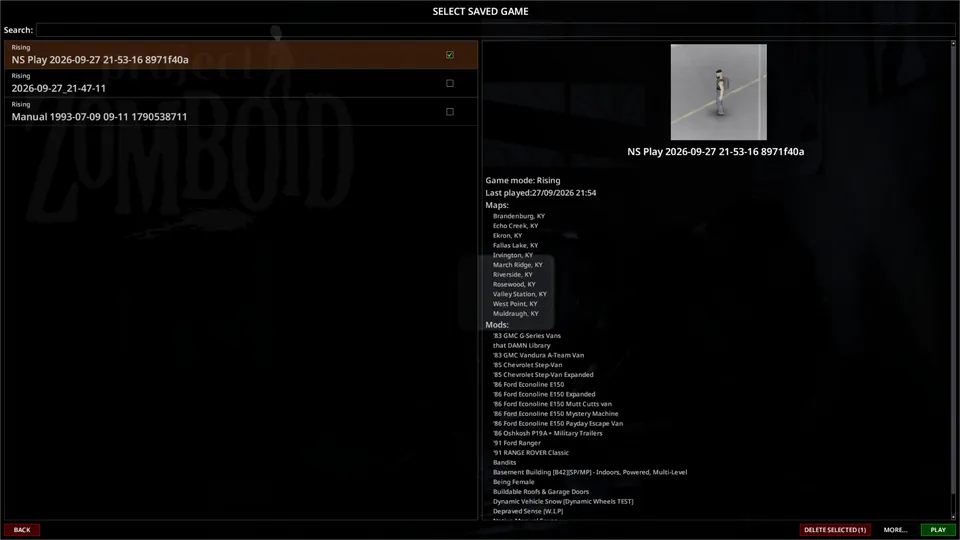
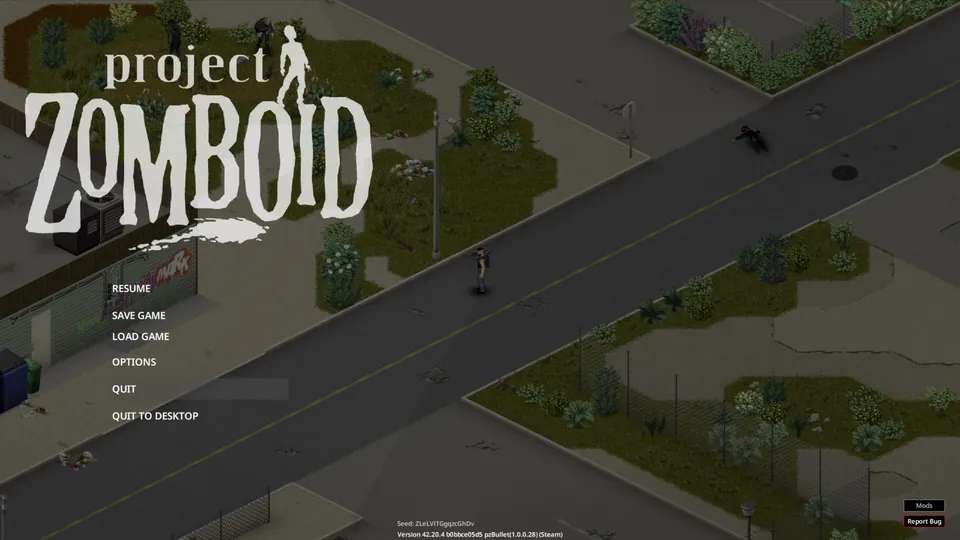
Save and overwrite normally stay inside gameplay using the native world save plus verified snapshot handling.
No fixed slot count. Search, sort, rename, overwrite and delete as the library grows.
Managed saves remain visible in the normal Main Menu Load screen and keep the existing More workflow.
Before loading, the system can flag missing, disabled, new or changed mods and stronger map-mod differences.
Each manual snapshot carries a gameplay thumbnail and timestamp data for fast visual identification.
Overwrite and delete flows use staged copies, verification and recoverable data instead of blind replacement.
Project Zomboid writes its normal world state while the game is paused.
The companion stages the world, preserves the player handoff and verifies copied data before publishing the snapshot.
The selected snapshot stays separate from the working world so ordinary play does not silently mutate the rollback point.
Loading uses Project Zomboid world teardown and initialization. The mod covers the handoff and validates the selected environment first.
The snapshot records the mod environment at capture time and compares it against the current environment before load.
The current package includes the mod, Windows companion source, local build/install workflow and self-tests. Release identity and checksum are listed beside the download.
v0.6.3 · PZ 42.20 - 42.21.x · 2026-09-28
The current release keeps the supported Build 42 range current and preserves the transition surface across the world handoff.